ChatGPT编写俄罗斯方块
最近ChatGPT特别火, 吹得人把它吹上天了, 说它可以写代码, 可以通过美国的律师考试, 甚至说它可以替代人类. 但是我觉得这些都是夸大其词. 我对ChatGPT的看法是由于先天的原因, 他经常一本正经的胡说八道. 把它用来创作没准可以(譬如画画, 写小说, 反正本来就不要求真实), 但是用来做事实检查, 恐怕还差了那么一点, 一不小心就大力出悲剧. 对它的正确态度是知道这个工具能做什么, 不能做什么. 就像以前木工都用锯斧刨, 电钻出来了, 是个巨大进步, 但你不可能说电钻能取代所有木工工具. 电钻能做的事情, 用它做, 不能做的事情, 还是用锯斧刨. 用对了, 你会发现它是个好工具, 用错了, 你会发现它是个坏工具. ChatGPT也一样. 今天, 我们就让ChatGPT来进行创作, 看看它到底咋样.
从最简单的开始吧, 写个小游戏. 俄罗斯方块是个很简单的游戏, 它的规则也不复杂. 大家都玩过, 很多初学编程的人可能都写过. 我还记得2000年我初学编程的时候用Visual Basic 6, 然后窗口上拖了一堆控件, 用一堆button做出了一个可以玩的方块. 现在我们用ChatGPT来写一个试试.
第一步
打开ChatGPT, 发问:
can you please write a Tetris game in python for me?
它反应很快啊, 一秒钟就回复了:
Certainly! I can provide you with a basic implementation of the Tetris game in Python. Keep in mind that this implementation may not include all advanced features or graphics, but it should give you a good starting point. Here's the code:
然后就是洋洋洒洒的代码:
import pygame
import random

# Initialize the game
pygame.init()

# Set up the display
screen_width, screen_height = 800, 600
play_width, play_height = 300, 600
block_size = 30

top_left_x = (screen_width - play_width) // 2
top_left_y = screen_height - play_height

# Colors (RGB format)
WHITE = (255, 255, 255)
BLACK = (0, 0, 0)
RED = (255, 0, 0)
GREEN = (0, 255, 0)
BLUE = (0, 0, 255)
CYAN = (0, 255, 255)
MAGENTA = (255, 0, 255)
YELLOW = (255, 255, 0)
ORANGE = (255, 165, 0)
PURPLE = (128, 0, 128)

# Define the shapes of the tetrominoes
S = [['.....',
      '.....',
      '..00.',
      '.00..',
      '.....'],
     ['.....',
      '..0..',
      '..00.',
      '...0.',
      '.....']]

Z = [['.....',
      '.....',
      '.00..',
      '..00.',
      '.....'],
     ['.....',
      '..0..',
      '.00..',
      '.0...',
      '.....']]

I = [['..0..',
      '..0..',
      '..0..',
      '..0..',
      '.....'],
     ['0000.',
      '.....',
      '.....',
      '.....',
      '.....']]

O = [['.....',
      '.....',
      '.00..',
      '.00..',
      '.....']]

J = [['.....',
      '.0...',
      '.000.',
      '.....',
      '.....'],
     ['.....',
      '..00.',
      '..0..',
      '..0..',
      '.....'],
     ['.....',
      '.....',
      '.000.',
      '...0.',
      '.....'],
     ['.....',
      '..0..',
      '..0..',
      '.00..',
      '.....']]

L = [['.....',
      '...0.',
      '.000.',
      '.....',
      '.....'],
     ['.....',
      '..0..',
      '..0..',
      '..00.',
      '.....'],
     ['.....',
      '.....',
      '.000.',
      '.0...',
      '.....'],
     ['.....',
      '.00..',
      '..0..',
      '..0..',
      '.....']]

T = [['.....',
      '..0..',
      '.000.',
      '.....',
      '.....'],
     ['.....',
      '..0..',
      '..00.',
      '..0..',
      '.....'],
     ['.....',
      '.....',
      '.000.',
      '..0..',
      '.....'],
     ['.....',
      '..0..',
      '.00..',
      '..0..',
      '.....']]

shapes = [S, Z, I, O, J, L, T]
shape_colors = [GREEN, RED, CYAN, YELLOW, BLUE, ORANGE, PURPLE]


class Piece(object):
    rows = 20
    columns = 10

    def __init__(self, column, row, shape):
        self.x = column
        self.y = row
        self.shape = shape
        self.color = shape_colors[shapes.index(shape)]
        self.rotation = 0


def create_grid(locked_positions={}):
    grid = [[BLACK for _ in range(Piece.columns)] for _ in range(Piece.rows)]

    for row in range(Piece.rows):
        for column in range(Piece.columns):
            if (column, row) in locked_positions:
                color = locked_positions[(column, row)]
                grid[row][column] = color

    return grid


def convert_shape_format(piece):
    positions = []
    shape_format = piece.shape[piece.rotation % len(piece.shape)]

    for row in range(len(shape_format)):
        for column in range(len(shape_format[row])):
            if shape_format[row][column] == '0':
                positions.append((piece.x + column, piece.y + row))

    for i, pos in enumerate(positions):
        positions[i] = (pos[0] - 2, pos[1] - 4)

    return positions


def valid_space(piece, grid):
    accepted_positions = [[(column, row) for column in range(Piece.columns) if grid[row][column] == BLACK] for row in range(Piece.rows)]
    accepted_positions = [position for sublist in accepted_positions for position in sublist]

    formatted_shape = convert_shape_format(piece)

    for pos in formatted_shape:
        if pos not in accepted_positions:
            if pos[1] > -1:
                return False

    return True


def check_lost(positions):
    for pos in positions:
        x, y = pos
        if y < 1:
            return True

    return False


def draw_text_middle(surface, text, size, color):
    font = pygame.font.SysFont('comicsans', size, bold=True)
    label = font.render(text, 1, color)

    surface.blit(label, (top_left_x + play_width/2 - (label.get_width()/2), top_left_y + play_height/2 - label.get_height()/2))


def draw_grid(surface, grid):
    for row in range(Piece.rows):
        for column in range(Piece.columns):
            pygame.draw.rect(surface, grid[row][column], (top_left_x + column*block_size, top_left_y + row*block_size, block_size, block_size))

    pygame.draw.rect(surface, RED, (top_left_x, top_left_y, play_width, play_height), 4)


def clear_rows(grid, locked):
    full_rows = []
    for row in range(Piece.rows):
        if BLACK not in grid[row]:
            full_rows.append(row)

    for full_row in full_rows:
        del grid[full_row]
        grid.insert(0, [BLACK for _ in range(Piece.columns)])

    for row in full_rows:
        for position in range(Piece.columns):
            if (position, row) in locked:
                del locked[(position, row)]

    return len(full_rows)


def draw_next_shape(piece, surface):
    font = pygame.font.SysFont('comicsans', 30)
    label = font.render('Next Shape', 1, WHITE)

    x = top_left_x + play_width + 50
    y = top_left_y + play_height/2 - 100
    shape_format = piece.shape[piece.rotation % len(piece.shape)]

    for row in range(len(shape_format)):
        for column in range(len(shape_format[row])):
            if shape_format[row][column] == '0':
                pygame.draw.rect(surface, piece.color, (x + column*block_size, y + row*block_size, block_size, block_size), 0)

    surface.blit(label, (x + 10, y - 30))


def draw_window(surface, grid, score=0):
    surface.fill(BLACK)
    pygame.font.init()
    font = pygame.font.SysFont('comicsans', 60)
    label = font.render('Tetris', 1, WHITE)

    surface.blit(label, (top_left_x + play_width/2 - (label.get_width()/2), 30))

    # Score
    font = pygame.font.SysFont('comicsans', 30)
    label = font.render('Score: ' + str(score), 1, WHITE)

    x = top_left_x - 200
    y = top_left_y + 200

    surface.blit(label, (x + 20, y + 160))

    for row in range(len(grid)):
        for column in range(len(grid[row])):
            pygame.draw.rect(surface, grid[row][column], (top_left_x + column*block_size, top_left_y + row*block_size, block_size, block_size))

    pygame.draw.rect(surface, RED, (top_left_x, top_left_y, play_width, play_height), 4)

    draw_grid(surface, grid)


def main():
    locked_positions = {}
    grid = create_grid(locked_positions)

    change_piece = False
    run = True
    current_piece = Piece(5, 0, random.choice(shapes))
    next_piece = Piece(5, 0, random.choice(shapes))
    clock = pygame.time.Clock()
    fall_time = 0
    fall_speed = 0.27
    level_time = 0
    score = 0

    while run:
        grid = create_grid(locked_positions)
        fall_time += clock.get_rawtime()
        level_time += clock.get_rawtime()
        clock.tick()

        if level_time/1000 > 5:
            level_time = 0
            if fall_speed > 0.12:
                fall_speed -= 0.005

        if fall_time/1000 > fall_speed:
            fall_time = 0
            current_piece.y += 1
            if not (valid_space(current_piece, grid)) and current_piece.y > 0:
                current_piece.y -= 1
                change_piece = True

        for event in pygame.event.get():
            if event.type == pygame.QUIT:
                run = False
                pygame.display.quit()

            if event.type == pygame.KEYDOWN:
                if event.key == pygame.K_LEFT:
                    current_piece.x -= 1
                    if not valid_space(current_piece, grid):
                        current_piece.x += 1

                elif event.key == pygame.K_RIGHT:
                    current_piece.x += 1
                    if not valid_space(current_piece, grid):
                        current_piece.x -= 1

                elif event.key == pygame.K_DOWN:
                    current_piece.y += 1
                    if not valid_space(current_piece, grid):
                        current_piece.y -= 1

                elif event.key == pygame.K_UP:
                    current_piece.rotation += 1
                    if not valid_space(current_piece, grid):
                        current_piece.rotation -= 1

        shape_positions = convert_shape_format(current_piece)

        for i, pos in enumerate(shape_positions):
            x, y = pos
            if y > -1:
                grid[y][x] = current_piece.color

        if change_piece:
            for pos in shape_positions:
                p = (pos[0], pos[1])
                locked_positions[p] = current_piece.color

            current_piece = next_piece
            next_piece = Piece(5, 0, random.choice(shapes))
            change_piece = False
            score += clear_rows(grid, locked_positions)

        draw_window(win, grid, score)
        draw_next_shape(next_piece, win)
        pygame.display.update()

        if check_lost(locked_positions):
            run = False

    draw_text_middle(win, "You lost!", 80, WHITE)
    pygame.display.update()
    pygame.time.delay(2000)


win = pygame.display.set_mode((screen_width, screen_height))
pygame.display.set_caption('Tetris')
main()
我粗略的看了一下, 使用了pygame库. 把它保存成个py文件, 然后运行, 居然可以玩了. 还有记分, 不同的方块还用不同的颜色表示. 这点是很出乎我意料的.
但是很快, 就发现了问题, 当一行被填满的时候, 会消失, 但是消失的时候, 上面的方块并没有下来, 而是悬空了. 如下图所示:
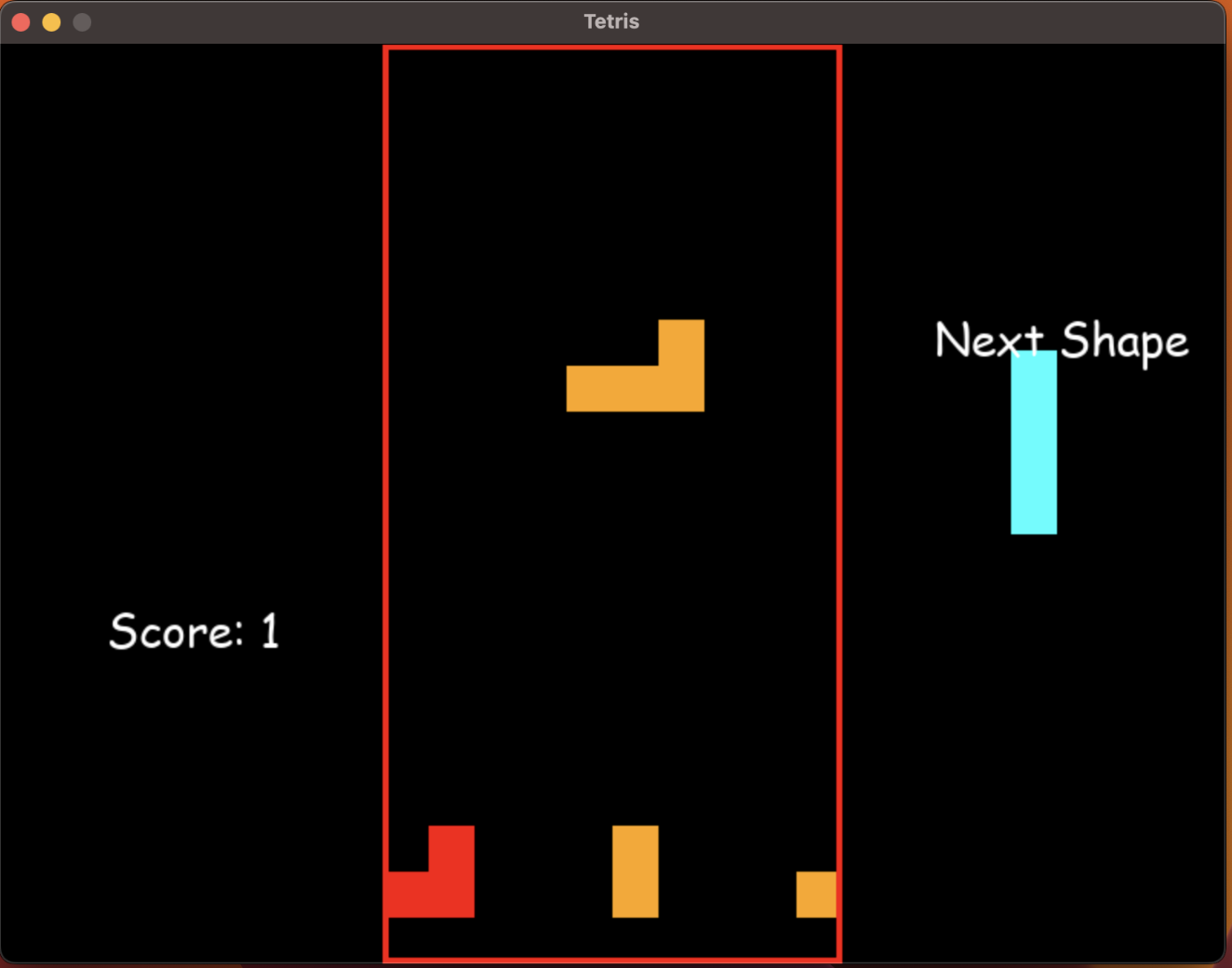
修改
这肯定没法玩, 因为没看代码, 我也不知道怎么改, 于是我就问ChatGPT
your clear_rows has a bug, after a row is cleared, the other blocks won't fall
ChatGPT一贯的谦虚, 你说它有错, 它马上就该是. 哪怕它其实是对的.
Apologies for the oversight. You're right; there is a bug in the clear_rows function that prevents the blocks from falling after a row is cleared. Here's an updated version of the clear_rows function that fixes the issue:

def clear_rows(grid, locked):
    full_rows = []
    for row in range(Piece.rows):
        if BLACK not in grid[row]:
            full_rows.append(row)

    for full_row in full_rows:
        # Clear the row
        del grid[full_row]
        grid.insert(0, [BLACK for _ in range(Piece.columns)])

    # Update the positions of the locked blocks
    for row in range(len(grid)):
        for column in range(len(grid[row])):
            if grid[row][column] != BLACK:
                if (column, row) in locked:
                    del locked[(column, row)]
                locked[(column, row + len(full_rows))] = grid[row][column]

    return len(full_rows)
我一样还是没看代码, 直接把这个函数替换掉了, 然后运行. 没想到更悲剧了. 一行消掉之后, 不但没有往下落, 消掉的那一行全花了. 如下图所示:
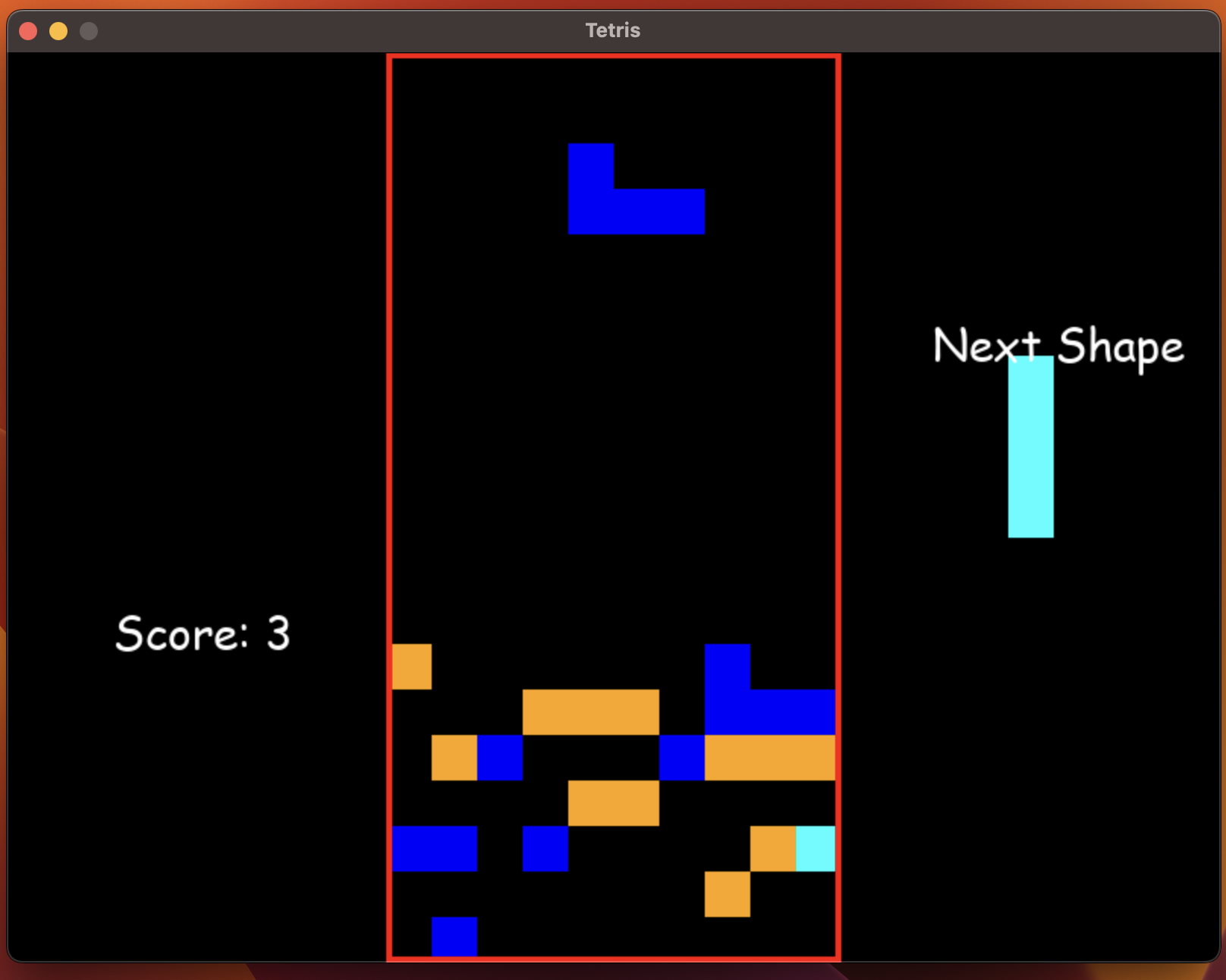
还得继续改. 很快啊, 它又给出了好几个版本, 我一一尝试, 但是发现有的直接运行报错, 有的运行了, 但是还有奇奇怪怪的问题, 这是他给出的第5个版本:
def clear_rows(grid, locked):
    full_rows = []
    for row in range(Piece.rows):
        if BLACK not in grid[row]:
            full_rows.append(row)

    for full_row in full_rows:
        del grid[full_row]
        grid.insert(0, [BLACK for _ in range(Piece.columns)])

    # Update the positions of the locked blocks
    new_locked = {}
    for position, color in locked.items():
        x, y = position
        if y < full_rows[0]:
            new_locked[(x, y + len(full_rows))] = color
        else:
            new_locked[(x, y)] = color

    return len(full_rows), new_locked
还是报错, 我实在不耐烦了, 终于看了一下代码, 发现这个函数的返回值是一个tuple, 但是调用的时候, 却是把它当成了一个int. 所以我直接告诉ChatGPT:
this is even worse. when a block drop I got this error:  Traceback (most recent call last):
  File "/Users/zhe203/dev/playground/PyTetris/main.py", line 453, in <module>
    main()
  File "/Users/zhe203/dev/playground/PyTetris/main.py", line 437, in main
    score += clear_rows(grid, locked_positions)
TypeError: unsupported operand type(s) for +=: 'int' and 'tuple'

you can not return a tuple for clear_rows. because in your code score += clear_rows(grid, locked_positions), you're expecting to return an integer
ChatGPT马上就改了, 这次改的很快:
def clear_rows(grid, locked):
    full_rows = []
    for row in range(Piece.rows):
        if all(grid[row]):
            full_rows.append(row)

    if len(full_rows) > 0:
        for row in full_rows:
            del grid[row]
            grid.insert(0, [BLACK] * Piece.columns)

        # Update the positions of the locked blocks
        new_locked = {}
        for position, color in locked.items():
            x, y = position
            if y not in full_rows:
                if y < max(full_rows):
                    new_locked[(x, y + len(full_rows))] = color
                else:
                    new_locked[(x, y)] = color

        return len(full_rows)

    return 0
这次终于可以玩了. 但是我发现, 还是有bug, 一行满了之后, 它不会消掉, 而是继续往上堆. 如下图所示:
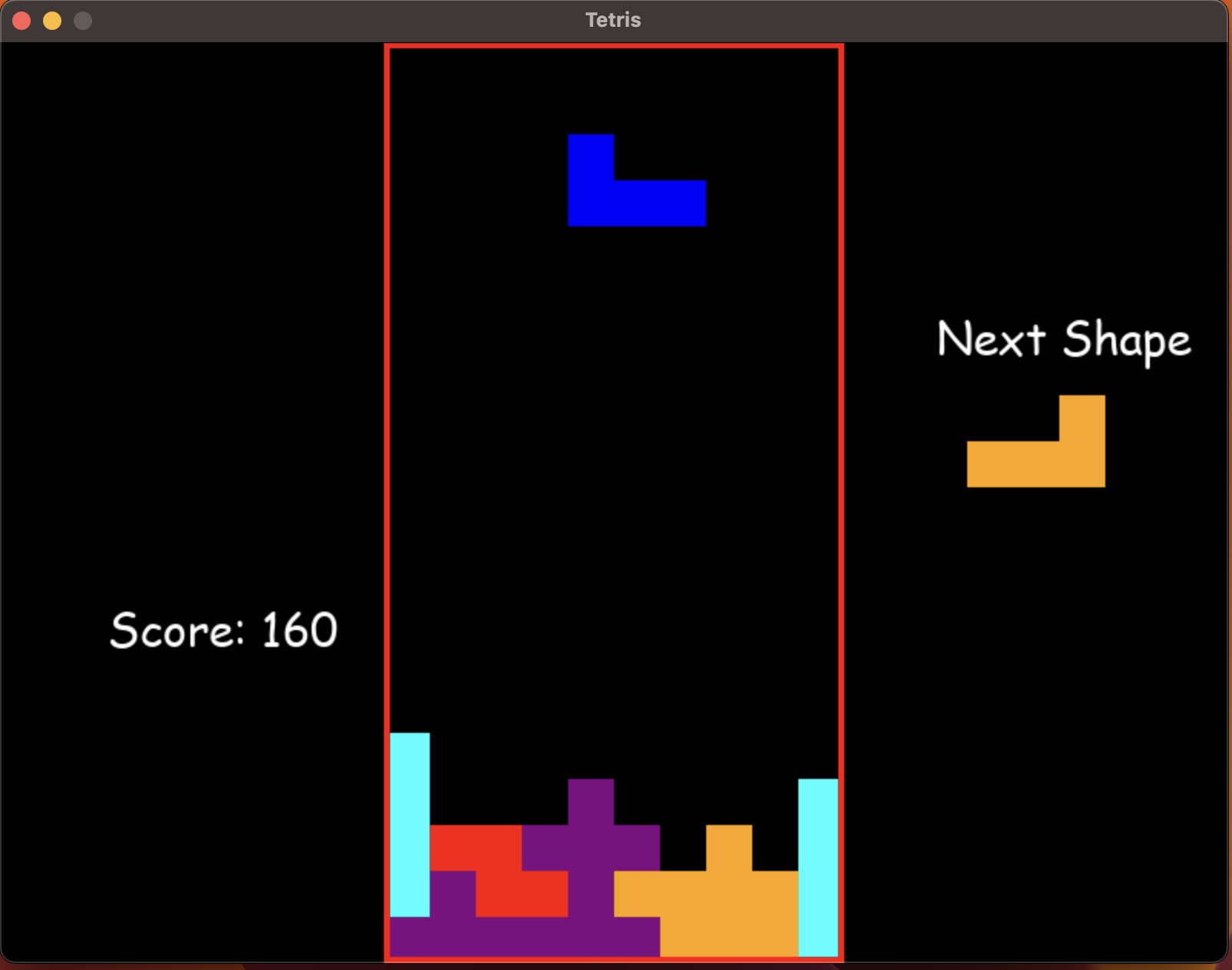
这5个版本, 已经耗费了很长时间, 我有点不耐烦了. 觉得再耗下去估计它也改不好, 我甚至都怀疑它到底是不是理解了我的意思. 于是我终于开始读代码了.
读代码
我发现ChatGPT生成的代码还是不错的, 基本的逻辑都有, 赶上初级程序员应该问题不大, 定位到问题其实不复杂, 至少设置个断点, 跟踪几步就知道了. 最后我只改了2行代码, 就解决了问题. 就是把clear_rows的调用函数改了.
(earn, locked_positions) = clear_rows(grid, locked_positions)
            score += earn * 10
既然它这么想返回tuple, 那就按照tuple的逻辑来调用函数, 奇葩的是第二行代码, 其实是Github Copilot给自动加的. chatGPT消一行给1分, 但是另一个GPT4加持的AI却觉得消一行得给10分. 我也懒得改了, 就这样吧.
总结
用ChatGPT的确可以提高效率, 譬如让我从0开始写一个俄罗斯方块游戏, 2个小时之内肯定完不成. 但是有GPT生成的代码作为底子, 只要把问题解决了, 就OK了. 还是可以大大提高生产效率的.
但是你要拿它生成的代码直接去交差或者交作业, 估计还是有点难度的. 毕竟它生成的代码, 各种问题. 而且你让它改, 它也不见得能立马改好. 还是免不了读代码, 如果能读懂代码, 甚至能定位到问题修改问题, 也非一日之功.
最后, Copilot你是懂你的同类ChatGPT的, 我在写的时候, 它把GPT生成的代码的毛病都给找出来了. 如图所示:
